
“Model properties are useful for design coordination, but they are rarely ready for supplier outreach.”
Watson
The Challenge
Procurement teams had the model data and the suppliers—but no system that connected them without spreadsheets and inbox chaos.
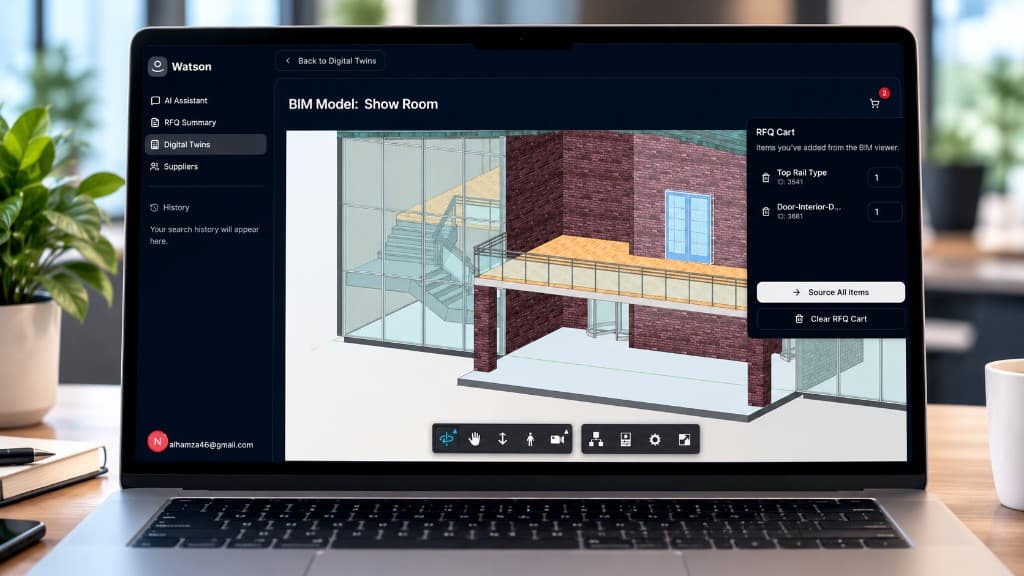
From the home screen, users can start with typed requirements, file attachments, or voice input. Inside the digital twin workspace, teams can upload BIM files or connect Autodesk workflows, review translated models in-browser, inspect individual elements, and push grouped items directly into procurement workflows.
That flow continues into RFQ drafting, supplier selection, and quote evaluation. The result is a single operational layer for moving from model context to sourcing action without relying on disconnected spreadsheets, inboxes, and viewer tools.
Model properties are useful for design coordination, but they are rarely ready for supplier outreach. The product needed a reliable way to convert element-level BIM data into structured procurement fields, quantities, and RFQ-ready line items.
Most teams inspect models in one tool and handle procurement in another. Watson needed a linked experience where selected elements, grouped quantities, and contextual properties could move directly from the viewer into sourcing workflows.
The system had to support supplier discovery, quote requests, AI-generated drafts, and proposal comparison while still giving teams a clear record of what was sent, to whom, and which offer was accepted.
“Most teams inspect models in one tool and handle procurement in another—Watson needed one linked flow.”
Solution
BimEx built a single operating layer where BIM element selection flows into RFQs, supplier outreach, and offer decisions without leaving the workspace.
Built a conversational sourcing entry point that accepts product descriptions, attachments, and voice input for technical procurement requests.
Integrated Autodesk Platform Services so teams can upload BIM files, translate models, and inspect digital twins directly in the browser.
Created an element-level sourcing flow where selected BIM objects are grouped, added to an RFQ cart, and passed into structured procurement forms.
Layered in AI workflows for category detection, supplier discovery, email drafting, voice-based supplier outreach, and proposal comparison.
“Most teams inspect models in one tool and handle procurement in another—Watson needed one linked flow.”
The Outcome
Results Delivered
Built a procurement studio where teams can move from model review to RFQ creation, supplier communication, and offer acceptance inside one connected workflow.
BIM elements become RFQ-ready line items in one workspace Browser digital twin review linked to sourcing actions Supplier discovery and quote follow-up drafts in the same flow RFQs, proposals, and accepted offers stay centralized
One workspace
From model to RFQ
BIM → RFQ
Element-level sourcing
AI outreach
Supplier follow-up drafts
“Model properties are useful for design coordination, but they are rarely ready for supplier outreach.”
Conclusion
The studio had every piece of the workflow except the connection between model context and sourcing action.
Watson already understood BIM review and procurement intent. What was missing was a structured layer that turned element-level model data into RFQ-ready line items, then carried that work through supplier discovery, outreach, and acceptance without losing the audit trail.
That pattern shows up anywhere valuable structured systems sit downstream of unstructured or siloed inputs. When people fill the gap by hand, speed and accuracy become the first casualties. Closing the loop with a connected workspace does not remove human judgment—it returns judgment to the decisions that actually need it.