
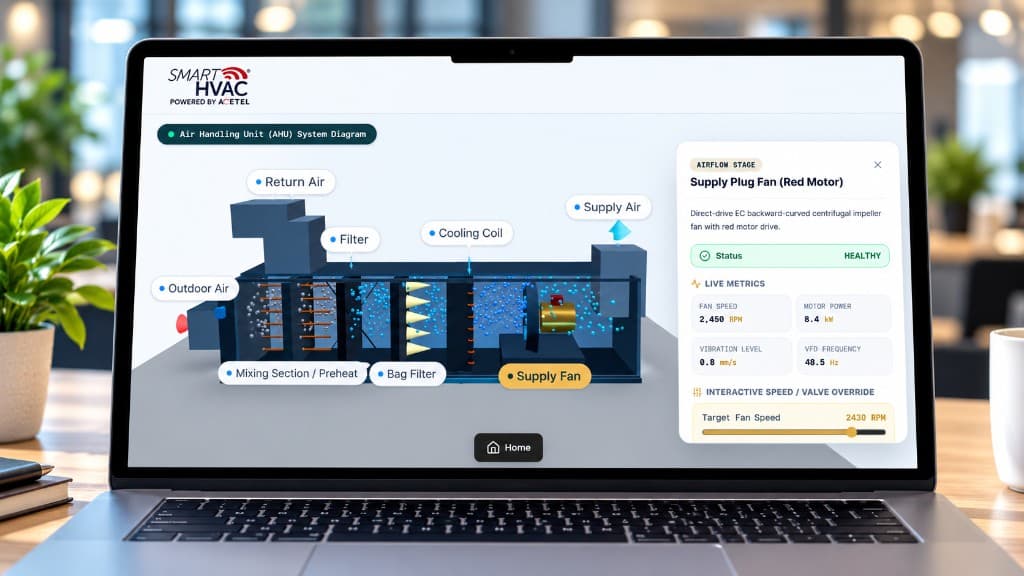
“Fan speed and valve overrides had to sit next to live RPM, power, and vibration—not as blind commands from a separate page.”
smartHVAC
The Challenge
A passive AHU cutaway was not enough—operators needed damper modes and temperature targets on the same diagram that showed airflow and live health.
We built an interactive Air Handling Unit system diagram with labeled hotspots for each airflow stage. Selecting a component opens a detail panel with health status, live metrics, and operator controls such as damper mode, temperature or coil targets, and interactive speed or valve overrides.
The result is a single mechanical operations view: operators see how air moves through the unit, confirm component health, and change damper modes or temperature setpoints without jumping between BMS screens and a disconnected 3D model.
Outdoor, return, and mixing dampers had to map clearly onto the cutaway so operators could switch modes without guessing which path was active or how outdoor and return air were blending.
Preheat and cooling coil controls needed to stay tied to the correct stage, with live feedback so a temperature change was visible against supply conditions and component health—not a floating setpoint form.
Fan speed and valve overrides had to sit next to live RPM, power, vibration, and frequency readings so operators could adjust with component status in view, rather than issuing blind commands from a separate control page.
Solution
BimEx delivered an interactive AHU system diagram with labeled stages, live telemetry, and controls for dampers, coils, and fan overrides.
Modeled the AHU as an interactive Three.js scene with labeled stages for outdoor air, return air, mixing/preheat, filtration, cooling coil, supply fan, and supply air.
Added component selection panels that surface health status, live metrics, and stage-specific controls for dampers, temperature targets, and speed or valve overrides.
Wired damper mode controls for outdoor, return, and mixing paths so operators can change operating modes directly from the system diagram.
Connected live telemetry for fan speed, motor power, vibration, VFD frequency, and related coil or valve signals so every override sits next to current equipment state.
Shipped a browser Home-to-AHU flow so facilities teams move from building operations into the mechanical twin without leaving the smartHVAC workspace.
The Outcome
Results Delivered
Delivered an AHU operations twin where facilities teams control damper modes and temperature targets from the same interactive system diagram that shows airflow stages and live component health.
Damper mode controls on outdoor, return, and mixing paths Temperature and coil targets tied to AHU stages Fan and valve overrides next to live equipment telemetry Labeled airflow twin for faster mechanical decisions
Damper modes
Outdoor, return, mixing
Temp targets
Tied to coil stages
Fan overrides
Next to live telemetry
“Fan speed and valve overrides had to sit next to live RPM, power, and vibration—not as blind commands from a separate page.”
Conclusion
Mechanical systems become operable when controls and context share one surface.
AHU Control shows that digital twins earn their keep when operators can change damper modes and temperature targets without leaving the airflow story. Telemetry next to the control is what makes overrides safe.
The same principle applies across plant equipment: remove the split between the picture and the panel, and judgment improves because the context never leaves the room.